

Today’s guide is for all web developers who work on web applications. It’s essential reading for those building APIs or front-ends. If you haven’t heard of CORS yet, you’ll likely come across it soon. To help you go beyond just “adding a header on the backend,” I encourage you to read on. I’ll break things down in simple terms, but keep in mind that this topic can be challenging, especially for beginners. For any tricky parts, I’ll provide links to external resources for further clarification.
Why Do We Need CORS?
Let’s start here. Browser creators care about user security. We live in a world where we can shop or do bank transactions from home. CORS is a mechanism that limits access to resources located outside our domain, primarily to prevent CSRF attacks. As a website admin, you have some responsibility for your users’ security. So, while this might seem like an extra hassle, it’s actually a way for browser developers to help out web developers.
This restriction doesn’t apply to images, CSS, JS files, or videos. That’s why you can load images from a different server or include a library hosted on a CDN without issue. CORS is mainly about HTTP requests sent through XMLHttpRequest, though you also need to consider fonts loaded with @font-face or images rendered in a canvas. Of course, you can allow connections to remote servers, for example, if your API is on another machine. More on that soon.
When Does the Browser Use CORS?
- The domain is different (e.g.,
example.comcallsapi.com) - There’s a different subdomain (e.g.,
web.example.comcallsapi.example.com) - There’s a different port (e.g.,
example.comconnects toexample.com:8080) - The protocol changes (e.g.,
http://example.comconnects tohttps://example.com)
How Does CORS Work?
Cross-Origin Resource Sharing (CORS) is a set of headers needed to establish a connection with a remote machine. Typically, we have a web app on one side and a remote API on the other. CORS has two main scenarios. The browser automatically picks one based on the content you want to send.
Simple Request
A request is considered simple if:
- It doesn’t include cookies.
Content-Typeisapplication/x-www-form-urlencoded,multipart/form-data, ortext/plain.- It uses
GET,HEAD, orPOSTmethods. - It only includes headers from this list:
Accept,Accept-Language,Content-Language,DPR,Downlink,Save-Data,Viewport-Width, andWidth.
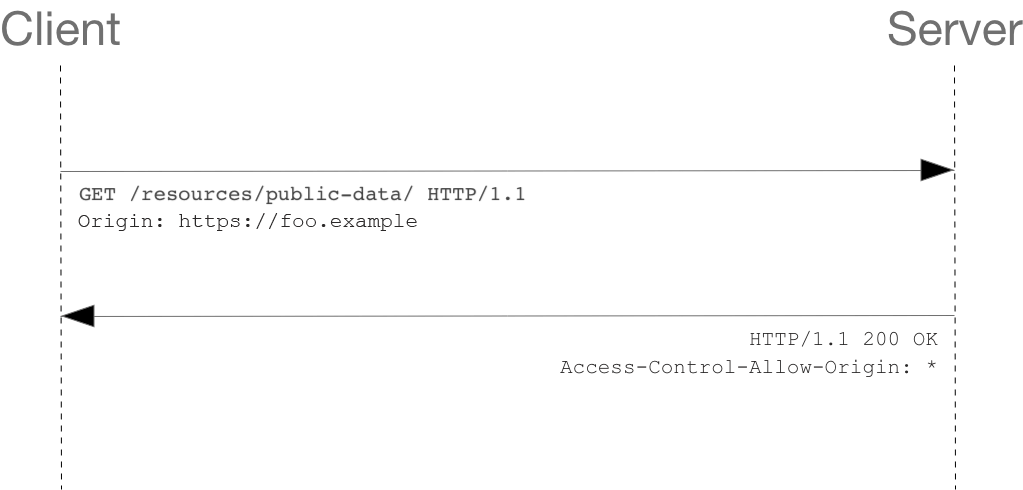
In this case, the browser adds an Origin header automatically with the domain name from where the request originated. This header can’t be changed. The server then responds with an Access-Control-Allow-Origin header, specifying which domains are allowed to connect. If it responds with a wildcard *, it allows connections from any domain. The API response will be blocked if:
Origin != Access-Control-Allow-Origin and Access-Control-Allow-Origin != *
Preflight Request
For requests that don’t meet the above criteria, we use a Preflight scenario. Here, the browser first sends an OPTIONS request to the API server, stating the type of connection it wants to establish (e.g., which HTTP method, what headers it plans to use, etc.). If the server approves, the actual request will then be sent. During this preflight check, the browser sends additional headers: Access-Control-Request-Method and Access-Control-Request-Headers, indicating the HTTP method and additional headers it plans to use. If the server agrees to the connection terms, it returns a 200 OK response.
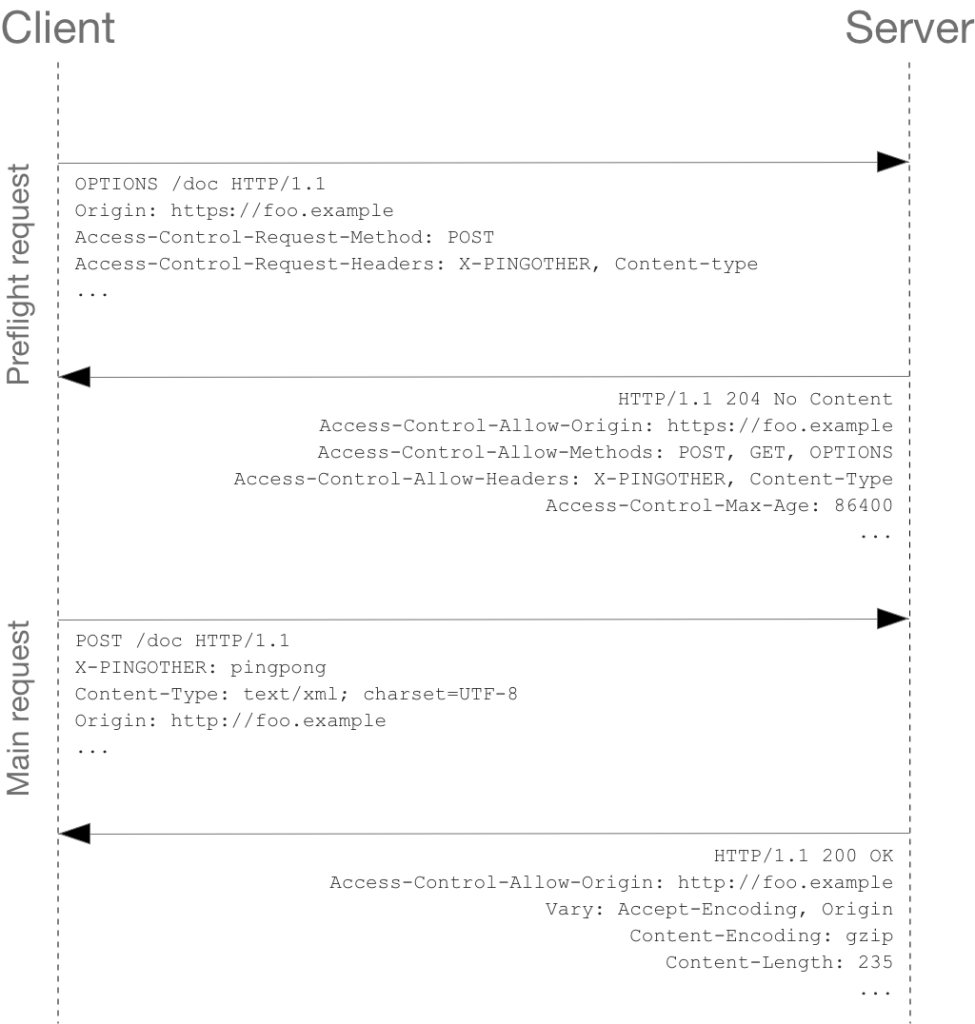
Source: https://developer.mozilla.org/en-US/docs/Web/HTTP/CORS
This guide aims to teach you something new, so let’s go over all this knowledge with a concrete example. On one side, we have a web application displayed by the browser, and on the other, an API located on a different server that provides us with certain resources.
Browser Requests
For HTTP requests from the browser, the headers are set automatically, based on the content to be sent and the originating domain. These include:
Origin: stores the origin of the server sending the request.Access-Control-Request-Method: stores the HTTP method we plan to use.Access-Control-Request-Headers: stores any additional headers likeContent-TypeorAccept.
In a simple request without cookies and with Content-Type as application/x-www-form-urlencoded, multipart/form-data, or text/plain, only the Origin header is added. In more complex cases, a Preflight request is needed. This sends an OPTIONS request with Access-Control-Request-Method and Access-Control-Request-Headers to inform the target server about the connection terms. If the server doesn’t agree, the main request won’t be sent.
API
On the API side, we can set the CORS headers that the server will return:
Access-Control-Allow-Origin: Origins allowed to connect. Use*in test environments, but avoid it in production. If you need to send cookies for user authentication, you must specify a particular origin!Access-Control-Allow-Methods: List of allowed HTTP methods, e.g.,POST,GET,OPTIONS- yes! It’s very important to allow also OPTIONS requests!.Access-Control-Allow-HeadersAccess-Control-Max-AgeAccess-Control-Allow-Credentials
Here’s a basic CORS connection diagram showing how a browser interacts with an API. Depending on the type of request, a Preflight check might be needed.
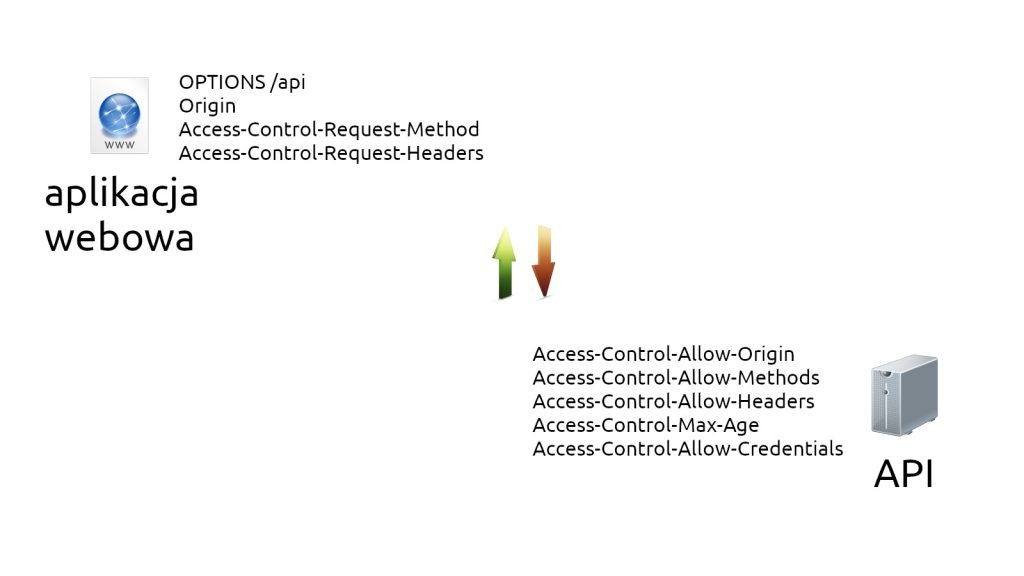
This is the connection scheme between the web browser and the API. Depending on the type of request we want to send through the browser, we may need a Preflight check, or we may not.
Source: http://wikipedia.org
Conclusion
With microservices, it’s common to have the front-end on one machine and the API on another, or on a different port. Understanding CORS is becoming essential. I hope this guide has helped clarify what CORS is all about.